
Introduction
Health data has become a cornerstone of our daily lives, enabling us to track our physical activity, sleep, nutrition, heart rate, and more. Apple’s Health app consolidates this data elegantly, but for anyone looking to go beyond the app and dive into deep analysis, building visualizations, or integrating with other tools, exporting and managing that data is essential.
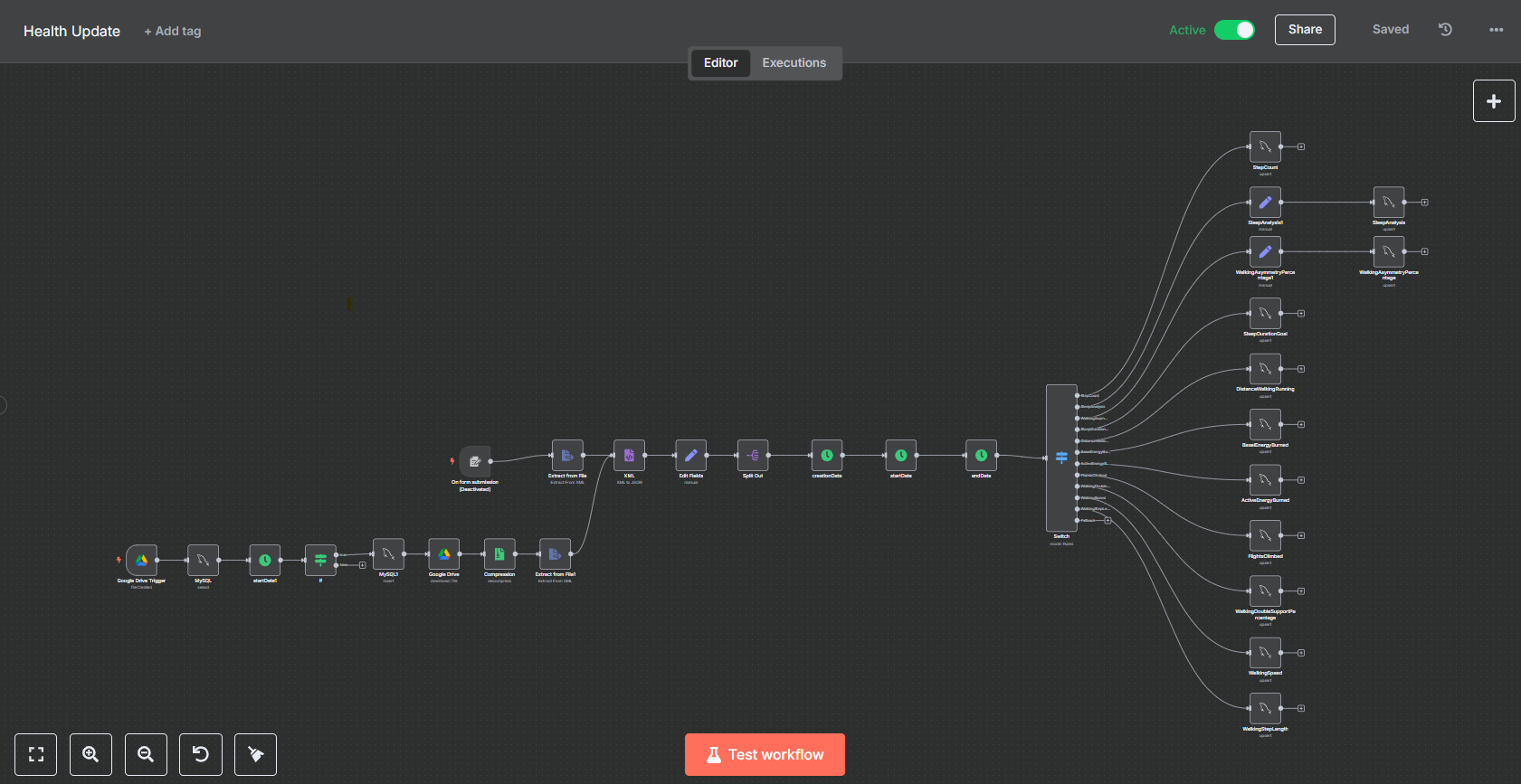
In this post, I’ll walk through how I automated the ingestion of Apple Health data into a MySQL database using n8n, an open-source workflow automation tool. From the moment I export my Apple Health data to Google Drive, everything else—file handling, data extraction, transformation, and loading into MySQL—happens automatically.
Whether you’re a data enthusiast or someone interested in automation tools, this guide will help you understand how you can build a powerful ETL (Extract, Transform, Load) pipeline for your personal health data.
Why Automate Apple Health Data?
Before diving into the technical details, let’s answer a fundamental question: why go through all this effort?
Apple’s Health app is amazing for surface-level tracking, but it has a few limitations:
- No automatic export feature. You must manually export your data.
- Limited visualization and analysis. Apple’s charts are helpful, but they don’t provide in-depth statistical or historical insights.
- Lack of integration. You can’t easily connect this data with third-party systems, dashboards, or databases.
By automating the data pipeline, I was able to:
- Maintain an up-to-date archive of my health data.
- Analyze long-term health trends using tools like Grafana, Jupyter Notebook, or Power BI.
- Create custom alerts or goals using logic I define.
- Preserve control and ownership of my data.
Step-by-Step Overview
Let me first give you a high-level view of the automation:
- Manual export from iPhone of Apple Health data (unfortunately, this is the only manual part).
- The data is saved to a specific folder in Google Drive.
- n8n monitors this folder and triggers a workflow when a new export appears.
- The zip file is downloaded and extracted, revealing a
export.xmlfile. - The XML data is parsed, timestamps are converted to my local timezone, and then split into different health data types (e.g., heart rate, step count, sleep).
- Each data type is inserted into a corresponding table in a MySQL database.
Let’s break it down in detail.
Manual Export from iPhone
Currently, Apple does not offer an API or automated export functionality for health data. So, the first step remains manual:
- Open the Health app on your iPhone.
- Tap your profile picture, then scroll down to Export All Health Data.
- Choose Google Drive as the destination, and upload the
.zipfile into a predefined folder (e.g.,/AppleHealthExports/).
Once this is done, automation takes over.
The Magic of n8n: Open Source Workflow Automation
n8n (pronounced “n-eight-n”) is an open-source tool that allows you to visually create workflows to automate tasks across various systems. It’s like Zapier or Integromat—but with code-level control and self-hosting capability.
Why did I choose n8n?
- Open-source & self-hostable – you own your data.
- Visual editor with logic control (IF, loops, etc.).
- Supports a wide range of integrations, including Google Drive, MySQL, HTTP, and file systems.
- Modular and extensible – you can write your own functions or scripts using JavaScript.
My n8n instance runs 24/7 on a home server, ensuring that workflows trigger instantly.
Monitoring Google Drive for New Files
The first node in the n8n workflow is the Google Drive Trigger. It watches a specific folder (AppleHealthExports) for new files. As soon as a new zip file is uploaded, it triggers the next steps.
Here’s how I set it up:
- Node type: Google Drive Trigger
- Mode: Watch for new file
- Folder ID: Specific to the Apple Health export location
- File filter:
.zip
Once the file is detected, the workflow kicks in.
Downloading and Extracting the Export
The next part of the workflow downloads the zip file using the Google Drive node, then passes it through a Function node that extracts its contents.
The Apple Health export comes as a zip file containing:
export.xml– the main file with all your data in XML format.export_cda.xml– in HL7 CDA format (optional, not used here).- Subfolders with workout routes, metadata, etc.
n8n has no built-in unzip node, so I used a small custom function in a FunctionItem node using JavaScript and the adm-zip library to extract the export.xml.
Parsing XML and Preprocessing
Once I have export.xml, I use an XML node to parse it into JSON.
Apple Health’s data model places all records inside a <Record> tag with attributes like:
xmlCopyEdit<Record type="HKQuantityTypeIdentifierStepCount" value="12" startDate="2024-05-20 08:15:00 +0000" endDate="2024-05-20 08:15:00 +0000"/>
Using a Function node, I iterate through each record and:
- Extract useful attributes (
type,value,startDate,endDate). - Convert UTC timestamps to my local timezone using JavaScript’s
Dateobject andtoLocaleString(). - Organize data into arrays grouped by
type, such as:- Step count
- Heart rate
- Distance walked
- Sleep analysis
This is essential because all types of data are bundled together in the export file.
Mapping to MySQL Tables
Before importing the data, I manually created MySQL tables corresponding to each data type. For example:
sqlCopyEditCREATE TABLE heart_rate (
  id INT AUTO_INCREMENT PRIMARY KEY,
  start_time DATETIME,
  end_time DATETIME,
  value FLOAT
);

CREATE TABLE step_count (
  id INT AUTO_INCREMENT PRIMARY KEY,
  start_time DATETIME,
  end_time DATETIME,
  value INT
);
Once the data is grouped and parsed, n8n pushes each data set into the correct table using the MySQL node.
The node takes an array of objects and maps them to the table’s columns. I use “Insert” operation and batch execution for speed and reliability.
Handling Duplicates and Updates
A small caveat: Apple’s exported data includes everything from the start of time to now. If you simply insert all records every time, you’ll create duplicates.
To solve this, I implemented:
- A deduplication check inside a Function node that filters out existing records based on
start_time. - Alternatively, you can use MySQL’s
INSERT IGNOREorON DUPLICATE KEY UPDATEif you define aUNIQUEconstraint onstart_timeandtype.
This makes the workflow idempotent, meaning you can run it multiple times without corrupting your data.
Additional Enhancements
This basic pipeline works well, but I’ve considered and implemented some optional extras:
Email or Discord Notification
Once the data is uploaded, I use an additional node to send myself a quick message using the Discord node:
“✅ Apple Health data has been imported successfully – a total of 202 activity records were processed and added to the MySQL database.”
You could also use Slack, email, or push notifications.
Data Visualization
With your health data now in MySQL, you’re free to build beautiful dashboards using:
- Grafana
- Metabase
- Power BI
- Apache Superset
Or even pull it into Jupyter Notebooks for more advanced analysis using Python.
Lessons Learned
Some takeaways from this project:
- Apple makes data export intentionally manual, so full automation isn’t possible yet.
- n8n is incredibly powerful once you learn its flow-based logic.
- Storing raw health data in a structured database opens up many possibilities—from machine learning to alerts and insights.
- This setup is modular and extensible, allowing future additions like wearable integration, goal tracking, and AI-based insights.
Conclusion
What started as a small project to understand my own health data evolved into a complete automation pipeline thanks to n8n. It now takes less than 30 seconds of my time every week to export data, and everything else happens seamlessly in the background.
The beauty of this setup is that it puts you in control—your data, your rules, your insights.
If you’re interested in replicating this setup, I’d recommend starting with a basic n8n installation and experimenting with small workflows. Once you see the power of automation, there’s no going back.
Tools Used:
- Apple Health (iPhone)
- Google Drive
- n8n
- MySQL
- Discord (for notifications)
Have questions or want help setting up a similar system? Feel free to reach out or leave a comment!